Out of office reply template
Copy-paste reply samples
Plain-text starting points for common out of office reply formats. Edit dates and names, then turn your message into HTML in the generator above and enable Gmail Vacation responder using the Gmail HTML vacation guide.
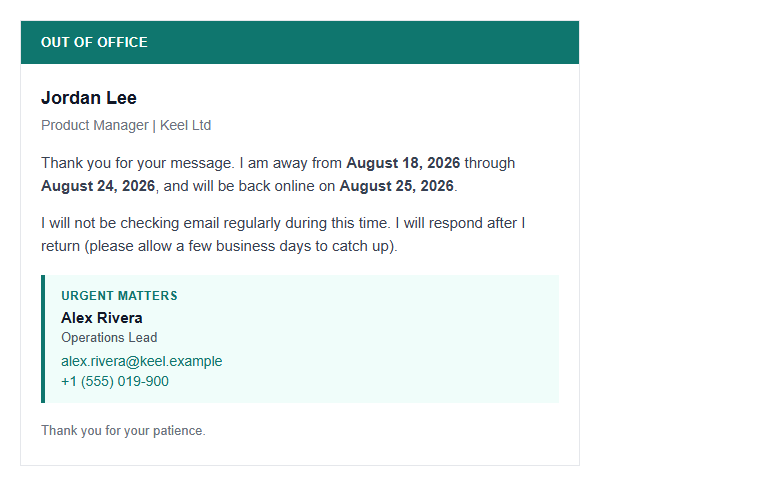
Professional vacation
Subject: Out of office until March 24
Thank you for your email. I am out of the office on vacation from March 18 through March 23, 2026, with limited access to email. I will respond to your message when I return on Monday, March 24. For urgent matters that cannot wait, please contact Alex Rivera at [email protected] or +1 555 123 4567. Thank you for your patience.
Short one-liner
Subject: Away until March 24
I am out of the office until March 24, 2026 and will have limited access to email during this time. I will reply to your message when I return. For anything urgent that cannot wait, please contact Alex Rivera at [email protected] or call +1 555 123 4567. Thank you for your patience.
Medical leave
Subject: Out of office on medical leave
Thank you for reaching out. I am out of the office on medical leave and expect to return on April 7, 2026. I will have limited email access during this time. For time-sensitive requests, please contact Jordan Lee at [email protected], who can assist in my absence. I appreciate your understanding.
Parental leave
Subject: On parental leave until June 2
I am currently on parental leave and will be away from email until June 2, 2026. I will check messages occasionally but may be slow to respond. For project updates or urgent questions, please contact Sam Chen at [email protected] or call +1 555 987 6543. Thank you for your support.
How to use the out of office generator
- Enter your name, away/return dates, and an urgent backup contact.
- Pick a vacation layout: Simple letter, Professional card, Schedule strip, or Branded header.
- Click Copy HTML — fragment only, safe for Gmail Vacation responder.
- Follow the Gmail HTML vacation guide to insert and save.
Why HTML vacation replies matter
Your auto-reply is often the first branded message a client sees while you are away. Broken markup or a leaked <title> looks unprofessional. Tables with inline CSS keep the layout readable in Gmail web and mobile.
Always include a clear return date and a backup contact when urgent issues cannot wait.
Best practices checklist
- Never include
<title>in vacation HTML - Use tables + inline styles only
- State when you return and who covers urgent mail
- Keep the message short — auto-replies are skimmed
- Test in Gmail Vacation responder before your leave starts
Related free tools
FAQ
Insert OOO HTML into Gmail in one click
Copy from this tool, or install html2email for the </> button in Vacation responder.
 Gmail/Yahoo - Free
Vacation setup guide · Free plan available